




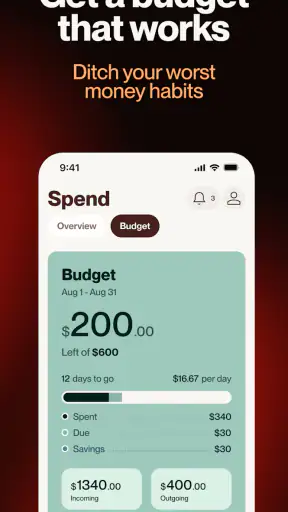
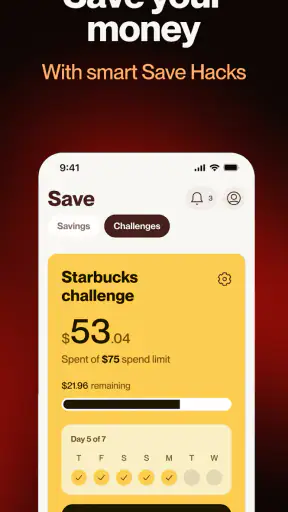
Money apps can be useful without being complicated, and that is the main reason I found Cleo AI interesting. It is a finance app from Cleo AI that brings budgeting, expense tracking, saving tools, credit-building guidance, and cash-advance access into one conversational experience. I would not describe it as a replacement for a full bank account or a careful spreadsheet, but it can make everyday money decisions feel less abstract.
My strongest recommendation is for someone who wants a more approachable way to look at spending. If checking a traditional banking dashboard makes you switch off, the app’s friendly style may help you start. The important thing is to treat it as a tool for understanding and planning, not as permission to borrow whenever your balance feels tight. The first useful win is not taking an advance; it is learning where your money is going and making one realistic adjustment.
What using Cleo feels like at the beginning
The app is free to install, carries a Teen content rating, and supports devices running version 10 or later of its required operating system. It was released on February 21, 2019, and the current version is 3.73.0. Its popularity is easy to see: it has passed five million installs, with an average rating of 4.7 from roughly 148 thousand ratings.
Those figures tell me that Cleo has reached well beyond people who already enjoy personal finance. The audience appears to include ordinary users looking for help with spending, saving, credit, or short-term cash flow. That broad appeal is useful, but it also means expectations need to be realistic. A beginner can get value from it, while someone wanting detailed investment analysis or advanced household accounting may find the experience too focused on everyday money management.
The conversational presentation is central to the experience. Instead of forcing you to begin with a dense set of categories and charts, Cleo encourages you to interact with your finances in a more direct way. I find that approach less intimidating than opening a conventional budgeting app and immediately facing a long setup form.
Still, a friendly tone does not remove the need to pay attention. Any finance app becomes more useful when its information is current and your accounts are connected correctly. Before acting on a spending suggestion, I would check that recent transactions are visible and that the balances make sense. A small amount of early checking prevents a lot of confusion later.
Who is likely to get the most from it
I would put Cleo high on the list for a first-time budgeter, a student or young worker trying to control irregular spending, and anyone who wants a quick view of recurring money habits. It can also suit a person who knows they should save but struggles to turn that intention into a repeatable routine.
The app is less suitable for someone who wants every financial decision handled manually. If you prefer building your own categories, entering every transaction yourself, and controlling every formula, a spreadsheet or a traditional budgeting service may feel more transparent. It is also not the ideal choice for someone looking for detailed investment research, tax preparation, or a complete replacement for a bank’s core services.
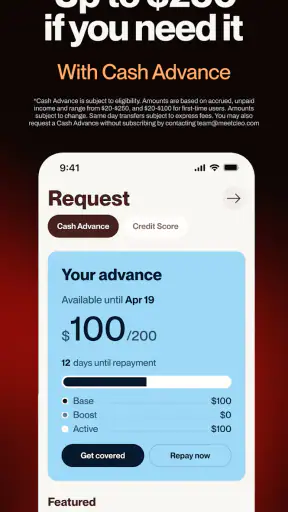
Borrowing deserves an especially careful distinction. A cash advance can be relevant when a necessary expense arrives before payday, but it should not become part of a normal monthly budget. If your income is consistently below your essential costs, an advance only moves the pressure forward. I would use Cleo’s borrowing-related tools as an emergency option to examine carefully, never as evidence that the underlying budget is healthy.
Setting up a useful first view
On first launch, I would resist the temptation to explore every option immediately. Start with the financial information you actually want to understand. If your main problem is overspending on small purchases, focus on the account and transaction view that can reveal that pattern. If saving is the priority, approach the setup with a specific target in mind rather than a vague promise to “do better.”
Take a moment to review how transactions are being grouped. Automatic categorization is convenient, but it is not always perfect. A purchase that looks like food, shopping, or a subscription to the app may mean something different in your household. Correcting a few important items is more valuable than spending an hour trying to make every historical transaction flawless.
My practical setup method would be to choose one recent week and inspect it carefully. Look for repeating charges, forgotten memberships, delivery spending, transport costs, and the small purchases that occur often enough to affect the month. This gives you a starting point based on real behavior instead of an idealized budget.
It is also worth deciding what you want the app to help you answer. “Can I afford this?” is a useful question, but it is too broad on its own. Better questions are: “Which category is quietly expanding?” or “What amount can I move toward savings without needing it again next week?” Clear questions make the app’s feedback easier to act on.
The first meaningful success
For a new user, I would define success as finding one spending pattern and changing one decision. Imagine that you install the app after noticing that the end of each month feels tight. After connecting your relevant financial view, you examine recent activity and discover that several modest purchases are adding up. Rather than setting an aggressive savings target, you choose one repeat expense to reduce and redirect a manageable amount toward savings.
That workflow is more sustainable than trying to cut everything at once. It also gives you a way to judge whether Cleo is helping: return after a few days or at the end of the week and see whether the change was realistic. If it was, repeat it. If it was not, adjust the target instead of treating the failed attempt as a personal failure.
A second useful workflow is to use the app before a known spending event. Before a weekend trip, a birthday, or a large household purchase, check recent spending and decide what can safely be used. This is where a tracker can be more helpful than a simple account balance, because the balance alone may not remind you about upcoming commitments.
Saving tools are most effective when connected to a reason. I would name the purpose in my own notes, even if the app presents the goal differently: a bill buffer, travel, school supplies, or a repair fund. A concrete purpose makes it easier to judge whether moving money now will create a problem later.
My tip is to measure progress by fewer surprises, not by perfect budgeting. If the app helps you recognize a recurring charge before it causes trouble, avoid an unnecessary purchase, or build a small cushion, it is already doing something valuable. Personal finance is often improved by repeated small decisions rather than one dramatic reset.
Where the credit and cash tools fit
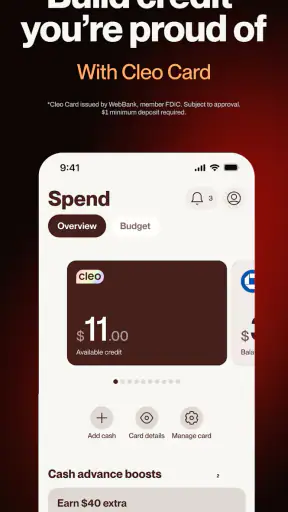
The store summary presents Cleo as covering cash advances, budgeting, expense tracking, credit-score improvement, and saving. That combination may sound like one complete solution, but these areas serve different purposes. Budgeting helps you plan. Tracking helps you understand past behavior. Credit guidance concerns how financial actions may affect your credit profile. A cash advance addresses a short-term timing problem.
I would keep those purposes separate in my head. Improving credit is generally a longer-term project, while an advance is immediate and temporary. Using one does not automatically solve the other. If your goal is credit improvement, concentrate on consistent financial habits and read the app’s guidance carefully rather than assuming that access to short-term money will build credit by itself.
Before considering an advance, I would check the full terms shown inside the app, including any repayment expectations and any cost attached to the particular option. The fact that the app is free to download does not mean every financial service within a finance app should be treated as cost-free. That distinction is easy to miss when several tools appear together in one interface.
There is also a behavioral trade-off. Fast access to money can reduce stress during a genuine timing gap, but it may make overspending feel harmless. I would only consider it when I already knew the repayment could fit into the next budget without sacrificing essentials. If repayment would require another advance, that is a clear sign to step back and look for a broader solution.
Common points of confusion
The first confusion is likely to be the difference between seeing a financial picture and having money available to spend. A budget estimate, a tracked balance, and an actual cash advance are not interchangeable. I would always verify which screen I am looking at before making a purchase or assuming that funds are ready.
Another common issue is expecting automatic categorization to understand personal context perfectly. A transaction label is a useful starting point, not a final judgment. Shared household purchases, transfers, refunds, and unusual one-off payments can make a category look misleading. If a budget seems wrong, inspect the underlying transactions before changing the budget itself.
Users may also wonder why a spending pattern does not change immediately after one adjustment. A tracker reflects activity over time; it cannot erase a recurring obligation simply because you noticed it today. The better approach is to identify whether the expense is fixed, flexible, or accidental. Fixed bills require planning, flexible purchases allow gradual reduction, and accidental charges may be solved by cancellation or a reminder.
The conversational personality can create a further misunderstanding. A playful response may make the app feel like a friend, but financial decisions still need sober judgment. I appreciate an approachable interface, yet I would not follow any suggestion automatically. I would compare it with my upcoming bills, available cash, and personal priorities.
Privacy and account access are also worth considering before setup. Because the app’s value depends on understanding financial activity, I would read the connection and account screens carefully and only link what I genuinely need for the job. Someone uncomfortable with connecting financial information may prefer a manual tracker, even if that option requires more work.
How it compares with familiar alternatives
Compared with a spreadsheet, Cleo is quicker for people who do not want to design formulas, maintain categories, and update every line manually. The trade-off is control. A spreadsheet shows exactly how its calculations work, while an automated app depends more on the way it interprets transactions and presents guidance.
Compared with a bank’s built-in spending view, Cleo’s appeal is its focus on behavior and coaching rather than simply displaying an account balance. A bank app remains the place I would use for core account actions and official account information. Cleo can add a more approachable layer for reviewing habits, saving, and considering financial choices, but I would not replace the bank’s records with a third-party view.
Compared with a dedicated credit-monitoring service, Cleo may be more convenient for someone who wants credit awareness alongside budgeting and saving. A specialist service may be preferable when credit reports, disputes, or detailed monitoring are the main concern. Likewise, a dedicated budgeting tool may suit a household that needs complex shared envelopes, extensive customization, or highly granular planning.
The advantage here is breadth. One app can bring several everyday money concerns into the same conversation. The disadvantage is that none of those areas should be mistaken for a complete specialist service. I see Cleo as a practical generalist: useful when you want a manageable starting point, less convincing when you already know exactly which advanced financial workflow you need.
A realistic month with the app
Consider someone paid on a regular schedule who reaches the final week of the month with very little flexibility. On the first day, they review recent expenses and notice that several small purchases are competing with a recurring bill. They adjust their plan, create a modest saving intention, and use the tracker during the next week before making nonessential purchases.
Mid-month, they review whether the change worked. If spending is lower, they keep the adjustment. If it caused too much inconvenience, they choose a smaller target. Near payday, they check upcoming commitments before deciding whether any cash is genuinely available for optional spending. This is a sensible role for Cleo: a repeated checkpoint that turns money awareness into a habit.
If an unexpected essential expense appears, the user can examine the cash-advance option separately, but only after checking repayment. If the numbers do not work, the correct conclusion is not that the app failed. It is that borrowing would add risk, and a different response is needed. That may mean contacting the bill provider, delaying a nonessential purchase, or seeking broader financial advice.
What to do after the first week
Once the initial setup is complete, I would avoid constantly changing the budget. Give the categories and saving plan enough time to reveal a pattern. Review the transactions at a regular moment that fits your life, such as after payday or before the weekend. A predictable review is easier to maintain than checking the app every time anxiety appears.
After that first review, focus on one question: did the information change what I did? If the answer is no, the app may need a clearer goal from you, or it may not match the way you prefer to manage money. Try a narrower use case, such as tracking subscriptions or preparing for a recurring bill. If it still feels like effort without a decision benefit, a simpler method could be better.
I would also revisit the app whenever income changes, a new bill begins, or a regular expense disappears. Budgeting tools become misleading when they are left based on an old version of your life. Updating the plan after a major change is more important than making the original setup perfect.
For someone considering the app mainly for credit improvement, patience matters. Look for clear explanations inside the relevant feature and treat progress as a long-term process. For someone interested in saving, start with an amount that will not force a withdrawal a few days later. For someone considering an advance, read the terms each time rather than relying on memory from a previous use.
My recommendation for a first-time user
I think Cleo is worth trying if you want a friendly starting point for budgeting and expense tracking and you are willing to check its information rather than accept every interpretation blindly. The combination of everyday spending help, saving prompts, credit-related guidance, and cash tools gives beginners several ways to engage with their finances without opening separate specialist apps.
I would skip it if you want a completely manual system, dislike conversational financial guidance, or need advanced planning for investments, taxes, or complicated shared finances. I would also avoid relying on the cash-advance side as a routine income supplement. A free app can be a useful doorway into better habits, but it cannot make an unaffordable budget affordable.
Overall, my view is positive but measured. Cleo AI is at its best when it turns vague money worry into one clear action: inspect a pattern, reduce a realistic expense, save a manageable amount, or pause before borrowing. Its broad feature set is helpful for beginners, while its automation and short-term money options require careful attention. Start small, verify what you see, and judge the app by whether your next financial decision becomes clearer.


